Emoji Kitchen
 (1 votes, average: 5.00 out of 5)
 Loading...


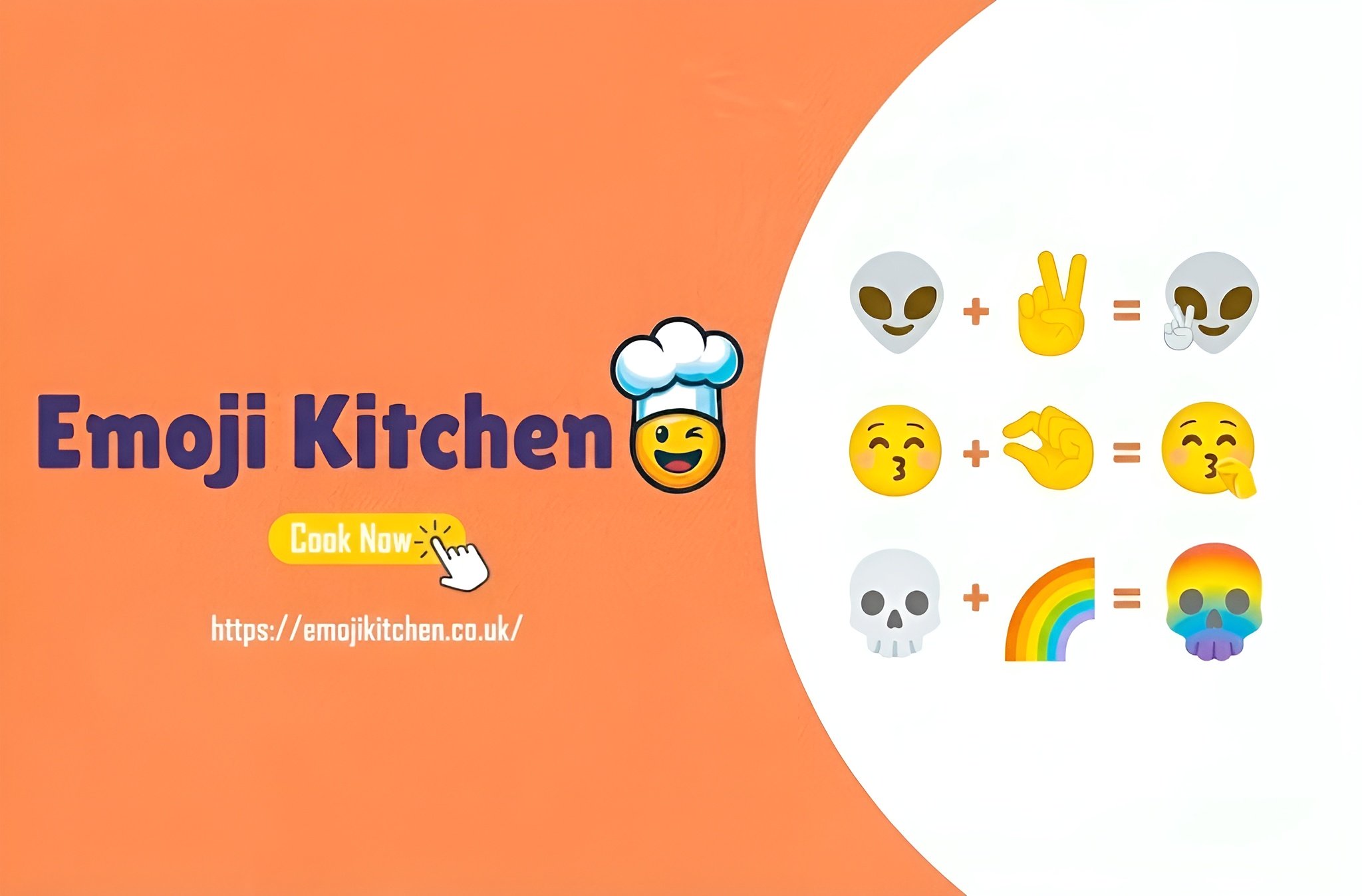
Create with Emoji Kitchen Online for free and dive into a fun world where emojis come alive in the silliest ways! Kitchen Emojis lets you mix two emojis to create brand-new, funny, and unique stickers.
Imagine a smiling robot with heart eyes or a unicorn that loves pizza. Your creativity has no limits! With more than 30,000 combinations to explore, you’ll always find something new to share.
Emoji Kitchen makes your chats brighter, your status cooler, and your feelings easier to show with just one tap.
Emoji Kitchen is a fun feature created by Google inside the Gboard keyboard app. It was first released in February 2020 on Android devices. Since then, Google has added thousands of new stickers and mashups, giving players over 100,000 emoji combinations to enjoy.
You can mix two emojis or add special effects like sparkles and magic to create fun, silly, and creative stickers. It’s the perfect way to make your chats more colorful and exciting!
Emoji Kitchen lets you get creative with emojis! To use it, open the emoji panel on Gboard, pick one emoji, and then tap another. Instantly, a brand-new sticker is created from the two emojis you chose.
You can save your custom stickers and share them in chats, on social apps, or even in your status updates. The best part is experimenting with endless combinations like a smiling face with a robot or a cat with a unicorn.
Every sticker is unique, making it fun, playful, and full of surprises every time you use it.
Emoji Kitchen works directly on your device with Gboard and our web version, allowing you to create and share fun emoji stickers anytime.
It supports Android phones, tablets, Chromebooks, and can also be accessed on iOS devices through the web.
You can use your custom emoji stickers in many popular apps, including:
Emoji Kitchen is a fun and creative tool that lets you make your own unique emoji stickers. You can use it on Gboard for Android, through Google, or directly on our website. Our emoji panel is updated with all the newest emojis, making it easy to mix and match without waiting for updates.
No matter what device you use, Android, iPhone, laptop, or desktop, you can create emojis easily on our website. Just pick two emojis to combine and watch a new, funny sticker appear.
You can save your favorites and share them with friends right away. Unlike using Google directly, our panel allows you to mix unlimited combinations instantly without delay.
If you have an Android device, install Gboard from Google Play and set it as your default keyboard. On devices like Google Pixel, Gboard is already installed. You can access Emoji Kitchen in two ways:
Pick your first emoji, and Gboard will show some creative variations. Then choose a second emoji to see new combinations. When you like your sticker, tap it to insert it directly into your message, ready to send.
iPhone users can use Emoji Kitchen through our website. You can combine emojis, explore random combinations, or copy ready-made stickers to share in chats. The web version offers two main options:
Once your sticker is ready, tap the share icon to send it through any messaging app. The website works perfectly on mobile, laptops, and desktops so you can create emojis anywhere.
Make the most of Emoji Kitchen with these simple and fun tips:
This fun and creative tool lets you make your own stickers by mixing emojis. Discover its exciting features:
The Emoji Kitchen version on our website is specially designed so you can create your own emoji stickers directly in your web browser, without needing to download anything.
It works smoothly on all major browsers, including Google Chrome, Firefox, Microsoft Edge, Safari, and Opera. Now you can mix, match, and create your favorite emoji stickers anywhere, with no installation required!
You can enjoy the modified version of Emoji Kitchen completely for free on our website. There is no need to pay any fees or buy anything inside the game.
In Emoji Kitchen, you can create hundreds of unique emoji stickers by mixing different emojis. Below is a list of some fun combinations and the ingredients used to make them.
Try them yourself and see what creative emojis you can make!
| Resulting Element ✨ | Combination Ingredients 🔄 |
|---|---|
| Acid Rain ☔️🧪 | rain 🌧️ + smoke 💨 / rain 🌧️ + smog |
| Air 💨 | Available at start |
| Airplane ✈️ | bird 🐦 + steel ⚙️ / bird 🐦 + metal 🔩 |
| Alarm Clock ⏰ | clock 🕰️ + sound 🔊 |
| Alcohol 🍷 | fruit 🍎 + time ⏳ / juice 🧃 + time ⏳ |
| Algae 🌿 | water 💧 + plant 🌱 / sea 🌊 + plant 🌱 / ocean 🌊 + plant 🌱 |
| Alien 👽 | life 🧬 + space 🌌 |
| Allergy 🤧 | human 🧑 + dust 🌪️ |
| Alligator 🐊 | lizard 🦎 + swamp 🌾 / lizard 🦎 + river 🌊 |
| Alpaca 🦙 | mountain ⛰️ + sheep 🐑 |
| Ambulance 🚑 | car 🚗 + hospital 🏥 / car 🚗 + doctor 👨⚕️ |
| Angel 😇 | human 🧑 + bird 🐦 |
| Angler 🎣 | human 🧑 + fishing rod 🎣 |
| Ant 🐜 | grass 🌾 + wild animal 🦝 / wild animal 🦝 + sugar 🍬 |
| Antarctica ❄️🐧 | snow ❄️ + desert 🏜️ / ice 🧊 + desert 🏜️ |
| Aquarium 🐠 | water 💧 + glass 🥛 / glass 🥛 + fish 🐟 |
| Archipelago 🏝️ | isle 🏝️ + isle 🏝️ |
| Armadillo 🦔 | wild animal 🦝 + armor 🛡️ |
| Armor 🛡️ | tool 🛠️ + metal 🔩 / tool 🛠️ + steel ⚙️ |
| Ash 🌋 | volcano 🌋 + energy ⚡️ |
| Astronaut 👨🚀 | human 🧑 + moon 🌕 / rocket 🚀 + human 🧑 / human 🧑 + space 🌌 |
| Astronaut Ice Cream 🍦🚀 | ice cream 🍦 + astronaut 👨🚀 |
| Atmosphere 🌍 | air 💨 + pressure 🌡️ / sky ☁️ + pressure 🌡️ |
| Atomic Bomb 💣 | energy ⚡️ + explosion 💥 |
| Aurora 🌌 | sun ☀️ + Antarctica ❄️ / sky ☁️ + Antarctica ❄️ / Antarctica ❄️ + atmosphere 🌍 |
| Avalanche ❄️🏔️ | energy ⚡️ + snow ❄️ |
| Axe 🪓 | blade 🔪 + wood 🌲 |
| Bacon 🥓 | pig 🐖 + fire 🔥 |
| Bacteria 🦠 | swamp 🌾 + life 🧬 |
| Baker 👩🍳 | human 🧑 + flour 🌾 / human 🧑 + bread 🍞 / human 🧑 + dough 🍞 |
| Bakery 🏠🍞 | house 🏠 + baker 👩🍳 / house 🏠 + bread 🍞 |
| Banana 🍌 | fruit 🍎 + monkey 🐒 |
| Banana Bread 🍞🍌 | bread 🍞 + banana 🍌 |
| Bandage 🩹 | blood 🩸 + fabric 🧵 |
| Bank 🏦 | house 🏠 + money 💰 / house 🏠 + gold 🪙 / house 🏠 + safe 🛡️ |
With Emoji Kitchen, you can mix any two emojis to make a brand-new sticker. Every combination is unique, giving you the freedom to craft emojis that match your feelings, style, or just your funny ideas!
Don’t settle for regular emojis. Emoji Kitchen lets you express yourself exactly how you want. Whether you’re happy, silly, or feeling creative, you can make an emoji that says it all.
Regular or standard emojis follow strict Unicode rules. They are supported across all devices and platforms and remain consistent over time. Examples include ❤️, 😂, 🎉, and 👍. Everyone sees these emojis in the same way, making them simple and universally understood.
Kitchen Emojis do not follow Unicode rules because they create custom stickers instead of standard emojis. This allows for unlimited creativity and unique combinations.
For example, you can mix a cat with sunglasses 😎 + 🐱 to make a “cool cat” sticker, or a pizza 🍕 + rocket 🚀 to make a “pizza rocket.” Each creation is unique, and people might interpret it in different ways.
Standard emojis work on all devices, including Android and iOS. Kitchen Emojis are mostly accessible on Android devices through Gboard. iPhone users can enjoy this feature via Google search or on websites like ours, which let you mix and create fun custom stickers directly in the browser.
With Emoji Kitchen on WhatsApp, you can create fun and unique stickers on our website and use them directly in your chats. Just follow these simple steps:
iPhone users can enjoy Emoji Kitchen directly from our website. You can create fun and unique stickers and use them in your messages. Here’s how to do it easily:
You can use Emoji Kitchen stickers from our website directly on Facebook. Create fun and unique emojis for comments, Messenger chats, or posts. Here’s how:
The Emoji Kitchen on our website lets you use all country flags. You can mix flag emojis with faces, animals, or objects to create fun and unique stickers.
Try different combinations and share your flag stickers with friends in chats and social apps directly from your browser.
If you want to play the Emoji Kitchen game, you can play it directly on our website.
In this fun game, your mission is to guess which two emojis were combined to create the sticker that appears on the screen. It’s simple, exciting, and a great way to test your creativity and emoji knowledge.
Many fans of Emoji Kitchen love to download the game to their devices for a better experience than playing it in a browser. Here’s how you can get it easily:
If your Android device does not support Google Play, download the APK file from a safe and official source, then install it manually to start creating custom emoji stickers.
If you’re a fan of Emoji Games, you’ll definitely enjoy these fun and creative games too:
Emoji Kitchen is a fun tool by Google that lets you combine two emojis to make a brand-new sticker. You can use it on Android with Gboard or directly in your web browser.
Open a messaging app with Gboard, tap the emoji icon, pick one emoji, then tap another to see a fun new sticker appear. You can also try it online in your browser on our website.
Emoji Kitchen works mainly on Android with Gboard. iPhone users can see some mashups through Google search or other emoji tools online.
You can use Emoji Kitchen stickers in most messaging apps:
Yes! Try combining the ✨ Sparkles emoji with another emoji to unlock special, fun versions of emojis.
After creating a sticker, tap it to copy, then paste it in your chat or save it to your device for later use.
If it isn’t working, update your Gboard, clear the app cache, or restart your device. Also, make sure your system software is up to date.
Yes! It’s completely free.
Emoji Kitchen makes chatting more exciting! Instead of using the same emojis, you can mix them to create new stickers. For example, combine toast 🍞 + robot 🤖 to get a funny toaster sticker. Try your own and share it with friends!
You can use Emoji Kitchen on Android by downloading Gboard, on iPhone from the Apple Store, or online through our website safely for free.
Emoji Kitchen lets you make thousands of creative stickers. Mix any two emojis and see what funny or surprising sticker appears. Share your creations with friends and enjoy endless fun!
You can get Emoji Kitchen by installing Google’s Gboard keyboard on Android. You can also try it online in your web browser.
No, Emoji Kitchen doesn’t use AI. It uses special emoji stickers created by Google’s designers.
Open Gboard, tap one emoji, then tap another. A fun new mixed sticker will appear that you can share or save.
Emoji Kitchen was first released by Google in 2020.
The 👩🍳 emoji mix shows a “woman cook.” People often use it when talking about cooking or food.
The 💀 emoji means “skull.” Online, people often use it to say something is very funny, like “I’m dead from laughing.”
Emoji Kitchen lets you create unique stickers by mixing different emojis. It’s fun, easy, and a new way to show your feelings and humor in chats.
You can explore endless combinations, save your favorite creations, and share them instantly with friends on Android or via our web version.
Start mixing emojis today and make your chats more colorful and fun!